
Fake news classification

Fake News Classification
In this project, we will apply CNN for fake news classification.
Peparation
First we need to import all the modules we need.
import pandas as pd
import tensorflow as tf
import nltk
from nltk.corpus import stopwords
from sklearn.preprocessing import LabelEncoder
from tensorflow.keras.layers.experimental.preprocessing import TextVectorization
import re
import string
from tensorflow.keras import layers
from tensorflow import keras
from tensorflow.keras import losses
from matplotlib import pyplot as plt
from sklearn.decomposition import PCA
import plotly.express as px
from plotly.io import write_html
Data Preparation
Import data and clean it.
train_url = "https://github.com/PhilChodrow/PIC16b/blob/master/datasets/fake_news_train.csv?raw=true"
df = pd.read_csv(train_url)
le = LabelEncoder()
df["fake"] = le.fit_transform(df["fake"])
num_fake = len(df["fake"].unique())
Make a Dataset
Define a function to make the data as the dataset we desired. For example, remove the stop words.
nltk.download('stopwords')
stopword = stopwords.words('english')

def make_dataset(df):

  df['title'] = df['title'].apply(lambda x: ' '.join([word for word in x.split() if word not in (stopword)]))
  df['text'] = df['text'].apply(lambda x: ' '.join([word for word in x.split() if word not in (stopword)]))

  ds = tf.data.Dataset.from_tensor_slices((
      {"title": df[["title"]],
       "text": df[["text"]]},
      {"fake": df["fake"]}
    ))
  return ds
[nltk_data] Downloading package stopwords to /root/nltk_data...
[nltk_data]   Unzipping corpora/stopwords.zip.
Apply the function to the data we need.
ds = make_dataset(df)
Validation Data
Split 20% of the data for validation.
ds = ds.shuffle(buffer_size = len(ds))

train_size = int(0.8*len(ds))
val_size = int(0.2*len(ds))

train = ds.take(train_size).batch(20)
val = ds.skip(train_size).take(val_size).batch(20)
Base rate
Compute the base rate.
print(len(ds),sum(df["fake"] == 1),sum(df["fake"] == 0))
11740/22449
22449 11740 10709


0.522963160942581
TextVectorization
#preparing a text vectorization layer for tf model
size_vocabulary = 2000

def standardization(input_data):
    lowercase = tf.strings.lower(input_data)
    no_punctuation = tf.strings.regex_replace(lowercase,
                                  '[%s]' % re.escape(string.punctuation),'')
    return no_punctuation

title_vectorize_layer = TextVectorization(
    standardize=standardization,
    max_tokens=size_vocabulary, # only consider this many words
    output_mode='int',
    output_sequence_length=500)

title_vectorize_layer.adapt(train.map(lambda x, y: x["title"]))
Model 1
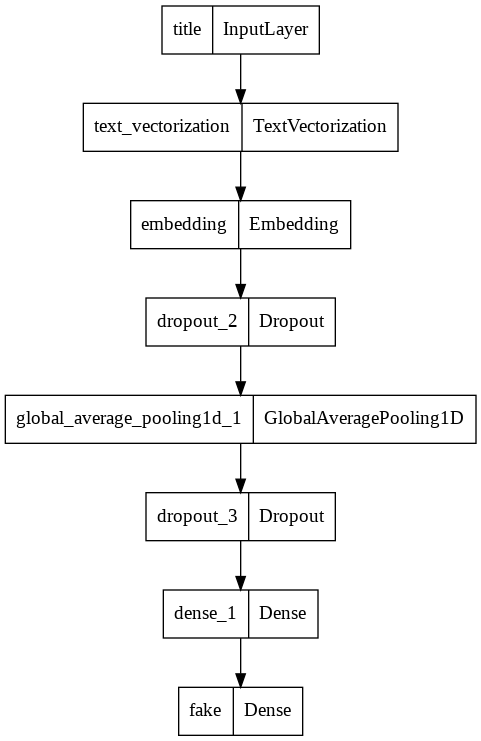
Model 1 would only use the article title as an input.
title_input = keras.Input(
    shape=(1,),
    name = "title",
    dtype = "string"
)

title_features = title_vectorize_layer(title_input)
title_features = layers.Embedding(size_vocabulary, output_dim = 2, name="embedding")(title_features)
title_features = layers.Dropout(0.2)(title_features)
title_features = layers.GlobalAveragePooling1D()(title_features)
title_features = layers.Dropout(0.2)(title_features)
title_features = layers.Dense(32, activation='relu')(title_features)

output = layers.Dense(num_fake, name="fake")(title_features)

model1 = keras.Model(
    inputs = title_input,
    outputs = output
)

keras.utils.plot_model(model1)
model1.compile(optimizer="adam",
        loss = losses.SparseCategoricalCrossentropy(from_logits=True),
        metrics=["accuracy"])

history = model1.fit(train,
            validation_data=val,
            epochs = 30,
            verbose = False)
/usr/local/lib/python3.7/dist-packages/keras/engine/functional.py:559: UserWarning: Input dict contained keys ['text'] which did not match any model input. They will be ignored by the model.
  inputs = self._flatten_to_reference_inputs(inputs)
plt.plot(history.history["accuracy"], label = "training")
plt.plot(history.history["val_accuracy"], label = "validation")
plt.gca().set(xlabel = "epoch", ylabel = "accuracy")
plt.legend()
<matplotlib.legend.Legend at 0x7f144d642750>
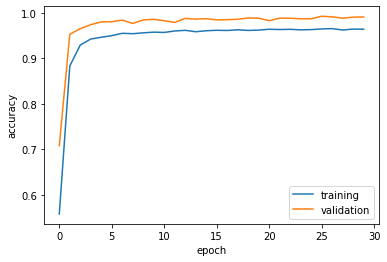
The validation accuracy stabilizes around 95% to 98%.
Model 2
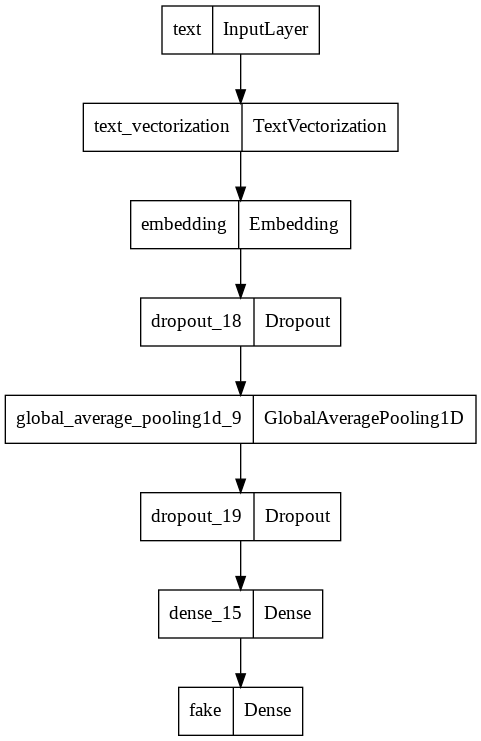
Model 2 would only use article titles as input.
text_input = keras.Input(
    shape=(1,),
    name = "text", # same name as the dictionary key in the dataset
    dtype = "string"
)

text_features = title_vectorize_layer(text_input)
text_features = layers.Embedding(size_vocabulary, output_dim = 2, name="embedding")(text_features)
text_features = layers.Dropout(0.2)(text_features)
text_features = layers.GlobalAveragePooling1D()(text_features)
text_features = layers.Dropout(0.2)(text_features)
text_features = layers.Dense(32, activation='relu')(text_features)

output = layers.Dense(num_fake, name="fake")(text_features)

model2 = keras.Model(
    inputs = text_input,
    outputs = output
)

keras.utils.plot_model(model2)
model2.compile(optimizer="adam",
        loss = losses.SparseCategoricalCrossentropy(from_logits=True),
        metrics=["accuracy"])

history = model2.fit(train,
            validation_data=val,
            epochs = 30,
            verbose = False)
/usr/local/lib/python3.7/dist-packages/keras/engine/functional.py:559: UserWarning: Input dict contained keys ['title'] which did not match any model input. They will be ignored by the model.
  inputs = self._flatten_to_reference_inputs(inputs)
plt.plot(history.history["accuracy"], label = "training")
plt.plot(history.history["val_accuracy"], label = "validation")
plt.gca().set(xlabel = "epoch", ylabel = "accuracy")
plt.legend()
<matplotlib.legend.Legend at 0x7f142a14ba10>
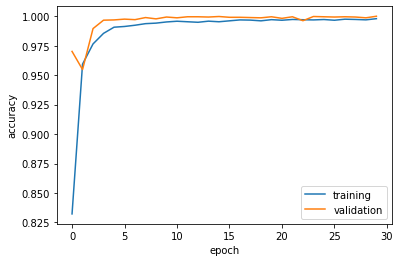
The validation accuracy stablizes at around 95% to 98%.
Model 3
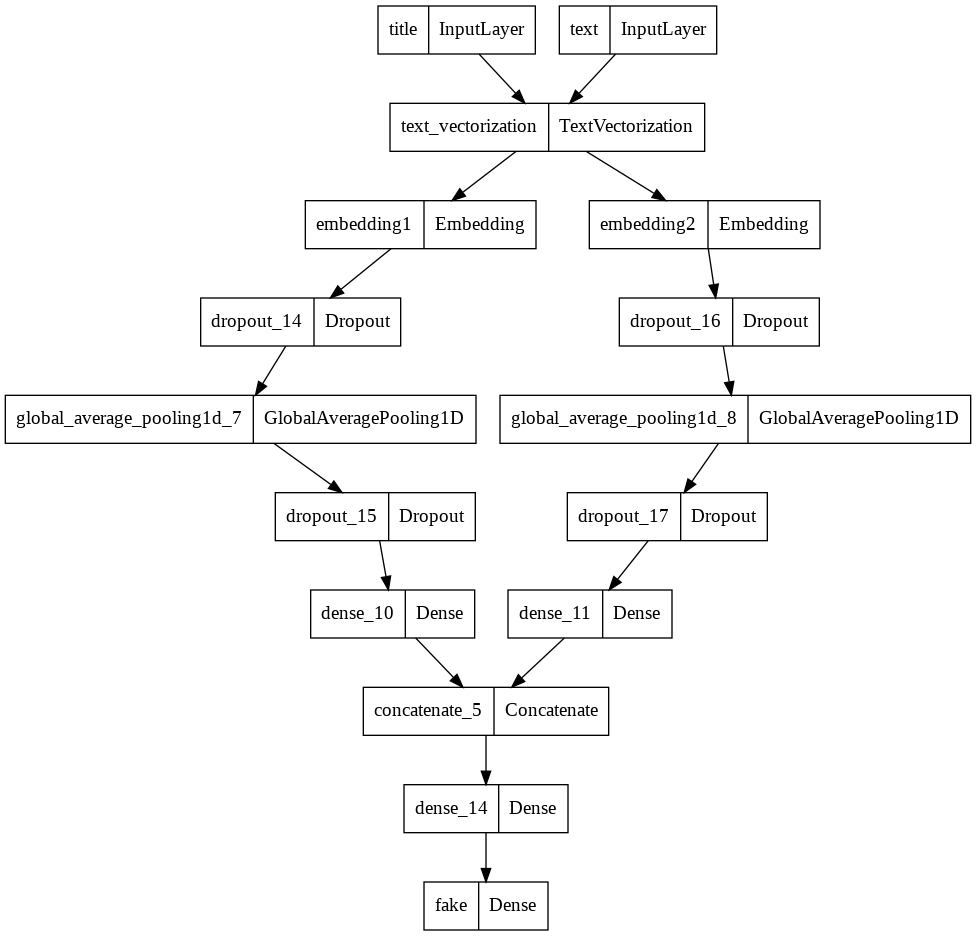
Model 3 would use both articles texts and titles as input.
main = layers.concatenate([title_features, text_features], axis = 1) # Combine the layers of the first two models
main = layers.Dense(32, activation='relu')(main)

output = layers.Dense(num_fake, name="fake")(main)
model3 = keras.Model(
    inputs = [title_input, text_input],
    outputs = output
)

keras.utils.plot_model(model3)
model3.compile(optimizer="adam",
              loss = losses.SparseCategoricalCrossentropy(from_logits=True),
              metrics=["accuracy"])
history = model3.fit(train,
                    validation_data=val,
                    epochs = 30,
                    verbose = False)
plt.plot(history.history["accuracy"], label = "training")
plt.plot(history.history["val_accuracy"], label = "validation")
plt.gca().set(xlabel = "epoch", ylabel = "accuracy")
plt.legend()
<matplotlib.legend.Legend at 0x7f144eaed1d0>

The validation accuracy stabilizes at 99% which is impressive.
Model Evaluation
Model 3 so far is the best model, we will use model 3 to evaluate the new data.
test_url = "https://github.com/PhilChodrow/PIC16b/blob/master/datasets/fake_news_test.csv?raw=true"
df_test = pd.read_csv(test_url)
ds = make_dataset(df_test)
ds = ds.shuffle(buffer_size = len(ds))
test = ds.batch(20)
model3.evaluate(test)
1123/1123 [==============================] - 6s 6ms/step - loss: 0.0224 - accuracy: 0.9939


[0.022355573251843452, 0.9939418435096741]
Model 3 scores a 99.4% of accuracy.
Embedding Visualization
weights = model3.get_layer('embedding2').get_weights()[0] # get the weights from the embedding layer
vocab = title_vectorize_layer.get_vocabulary()                # get the vocabulary from our data prep for later

pca = PCA(n_components=2)
weights = pca.fit_transform(weights)

embedding_df = pd.DataFrame({
    'word' : vocab,
    'x0'   : weights[:,0],
    'x1'   : weights[:,1]
})
fig = px.scatter(embedding_df,
                 x = "x0",
                 y = "x1",
                 size = [2]*len(embedding_df),
                # size_max = 2,
                 hover_name = "word")
write_html(fig, "embedding.html")
}) }; </script> </div>
</body> </html>
Word ‘trumps’ and ‘gop’ are most likely to be used in fake news, and their positions are far from the origin. On the other hands, words ‘election’, ‘aliens’,’syrian’ are neutral which are not helpful for the model to distiguish fake news.